








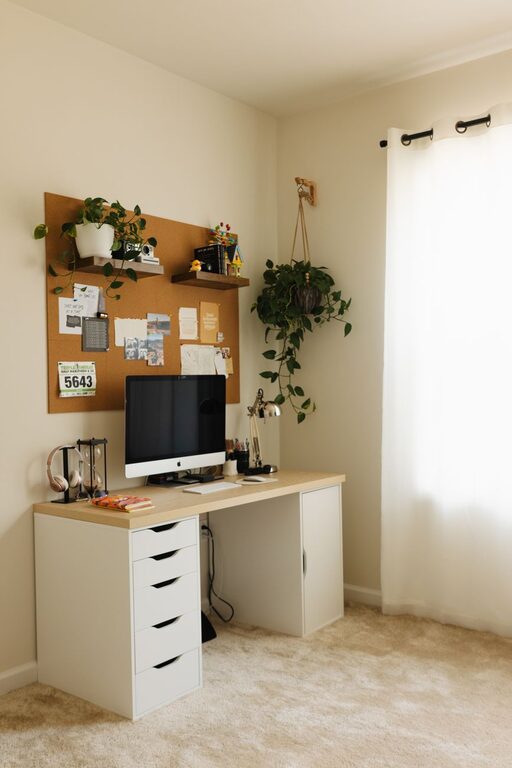
Creating a home workspace that feels both cozy and functional can transform your remote work experience. Whether you’re setting up a dedicated office room or carving out a small corner, the goal is to build a space that inspires focus while also feeling comfortable and inviting. In this guide, we’ll explore practical tips to help you design a workspace that supports your productivity and well-being.
Why a Cozy and Functional Workspace Matters
Working from home has become increasingly common, and having the right environment is key to staying motivated. A cozy space promotes relaxation and reduces stress, while functionality ensures you have everything needed to work efficiently. Balancing these elements leads to better focus, creativity, and overall satisfaction during your workday.
Choose the Right Location
Consider Natural Light
Position your workspace near a window if possible. Natural light helps reduce eye strain, improves mood, and keeps you alert throughout the day. If natural light is limited, invest in good quality lighting that mimics daylight, such as adjustable LED desk lamps.
Minimize Distractions
Pick a quiet corner away from high-traffic areas in your home. This helps minimize noise and interruptions, allowing deeper concentration. If you don’t have a separate room, use room dividers or curtains to create a visual boundary.
Invest in Comfortable and Supportive Furniture
Ergonomic Chair
A good chair supports your posture and prevents discomfort during long hours of sitting. Look for adjustable chairs with lumbar support, cushioned seats, and armrests.
Desk Size and Height
Choose a desk that fits your space and provides enough surface area for your computer, accessories, and notes. The desk height should allow your arms to rest comfortably at about a 90-degree angle when typing.
Consider Standing Options
If you like to switch positions, consider a sit-stand desk or a standing desk converter. Alternating between standing and sitting can boost circulation and reduce stiffness.
Organize Your Workspace Effectively
Keep Essentials Within Reach
Arrange items you use frequently—like pens, notebooks, and your phone—within easy reach to avoid distractions. Use desk organizers and trays to keep small items tidy.
Use Storage Solutions
Clutter can affect your focus and creativity. Use shelves, drawers, or filing cabinets to store documents and supplies neatly. Labeling storage can help you find things quickly.
Cable Management
Tidy up cables from your computer, charger, and other devices with clips, sleeves, or under-desk trays. A clean workspace not only looks better but also reduces frustration.
Add Personal and Comfort Touches
Soft Textiles
Incorporate cozy elements like a soft rug, cushions, or a throw blanket. These add warmth and make your workspace inviting.
Greenery
Plants not only brighten up the area but can also improve air quality and reduce stress. Opt for low-maintenance plants like succulents, snake plants, or pothos.
Personal Decorations
Include photos, art, or inspirational quotes that motivate you. Keep decoration minimal to avoid distraction but enough to make the space feel uniquely yours.
Optimize for Technology
High-Speed Internet
Ensure your work area has a reliable internet connection for smooth video calls and quick file transfers. If your chosen spot has weak Wi-Fi, consider a range extender or a wired connection.
Quality Equipment
Invest in quality headphones or speakers for clear audio during meetings. Ergonomic keyboards and mice can reduce strain and improve comfort.
Monitor Placement
Position monitors at eye level about an arm’s length away. This helps reduce neck and eye strain.
Maintain Good Lighting
Ambient Lighting
Use soft, ambient lighting to create a warm atmosphere. Overhead lights combined with desk lamps provide layers of light.
Task Lighting
Focus lamps or adjustable desk lights work well for reading, writing, or detailed work.
Avoid Glare
Position your screen and lighting carefully to avoid reflections and glare, which can cause headaches and eye strain.
Set Boundaries and Routine
Define Work Hours
Stick to specific working hours to separate professional and personal time. This helps maintain work-life balance.
Take Breaks
Schedule short breaks to stand, stretch, and rest your eyes. Use timers or apps to remind yourself.
End-of-Day Ritual
Clear your desk and organize your workspace at the end of each day to prepare for tomorrow and signal that work is over.
Final Thoughts
Designing a cozy and functional home workspace is about finding the right balance between comfort and practicality. By paying attention to lighting, furniture, organization, technology, and personal touches, you can create a space that feels welcoming and supports your productivity. With a thoughtful setup, working from home can become a more enjoyable and effective experience.